
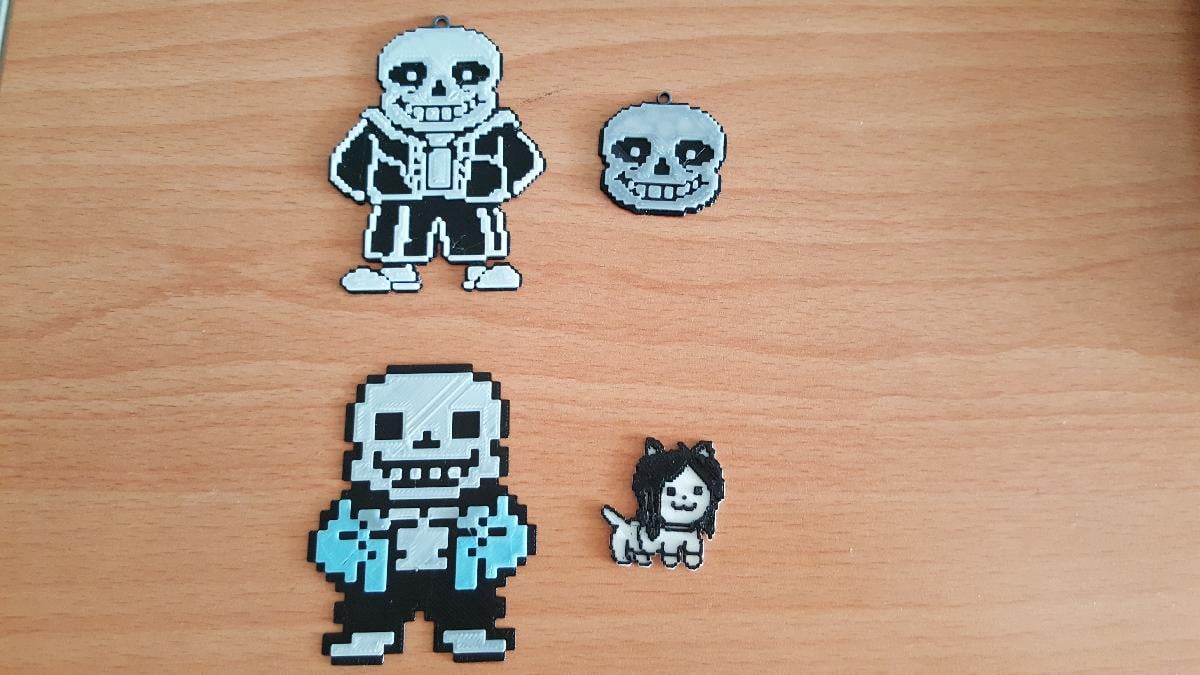
Imprimir STL Chaveiros de tom duplo de Undertale Modelo 3D - 1490119
Things 3D Fila
Chaveiros de tom duplo de Undertale
Jogos
Se você ainda não tem uma máquina para imprimir este arquivo pode comprar uma impressora 3d aqui!
Você pode imprimir este modelo 3d com estes filamentos ou com estas resinas 3D.
Sobre o objeto 3D Chaveiros de tom duplo de Undertale
Este é um arquivo desenvolvido e projetado com ferramenta CAD.
Se você ainda não sabe criar seu próprio modelo 3D eu te ensino neste artigo tutorial sobre Tinkercad.
Chaveiros de tom duplo de Undertale foi projetado para Impressora 3D. All art belongs to Toby FoxRead instructions before printing.Default thickness is 3mm per layer before scaling( eg. 3mm black + 3mm white +3mm for any subsequent layers), scale accordingly in z axis or x/y. Default thickness works fine with a 100% infill(especially if your filament is not completely opaque) and a 95% flow rate/ extrusion multiplier. They were printed using a 0.4mm nozzle and the minimum part scale. You can use a finer nozzle and scale down even more if you want a actually decent sized keychain :/Currently there are five versions(Settings below are used in the pictures):Sans Head(Min Scale:40%)3 layers Black, 3 layers WhiteSans Full(Min Scale 40%)3 layers Black, 3 layers WhiteSans Color(Min Scale 20%)3 layers Black, 3 layers White, 3 layers Blue, 3 layers GreyTemmie(Min Scale [55%,55%,25%]3 layers White, 3 layers BlackDog (Not yet tested; NOTE: Black Background which does not fit form)-3mm Black, 3mm White Instructions The presets were made by combining the two files in 123Design and scaling the part to minimum recommended part scale. I highly recommend scaling (un-uniformly) in the z axis as it is pretty thin(especially for a keychain).To customize to your own size,you can either a) manually move the ring into the scaled object and slice ignoring errors or b) use a CAD program like 123Design for manipulation if you are using a slicer like cura with auto placement.The ring is just a simple 3mm-5mm circle designed to allow use as a keychain.For option a) the slicing preview should show both objects merged together. Around 50% of the total layers is when you change your filament for duo tone objects. Eg. if you have 6 layers you change filament right at the end of the 3rd layer or at the start of the 4th layer Use your slicer of choice to see the exact layer.
Não deixe de imprimir e compartilhar este modelo 3d. Não deixe sua impressora 3D parada. Mas se você não tem uma impressora 3D ainda, escolha a sua agora.